
The answer is fine. The format is wrong.
Karpathy's post opens with one sentence: "We'll be spending a lot more time trying to understand the outputs of language models." His point: as AI does more of the work, more of our time goes into reading what it made, and checking it. His fix is not a better question. It is a better format. He gives four, each one step past the last, with "But even better:" between them.
- Writing. Ask the AI to explain something in ASD-STE100, a strict, simple English made for aircraft maintenance manuals.
- Diagrams. Instead of text, ask for a diagram. It is "a lot easier to process, parse, and understand".
- Web pages. Ask for the answer "in HTML" and you get "a beautiful, interactive webpage".
- Explainer videos. The format he is "most bullish on": a custom video made for one question.
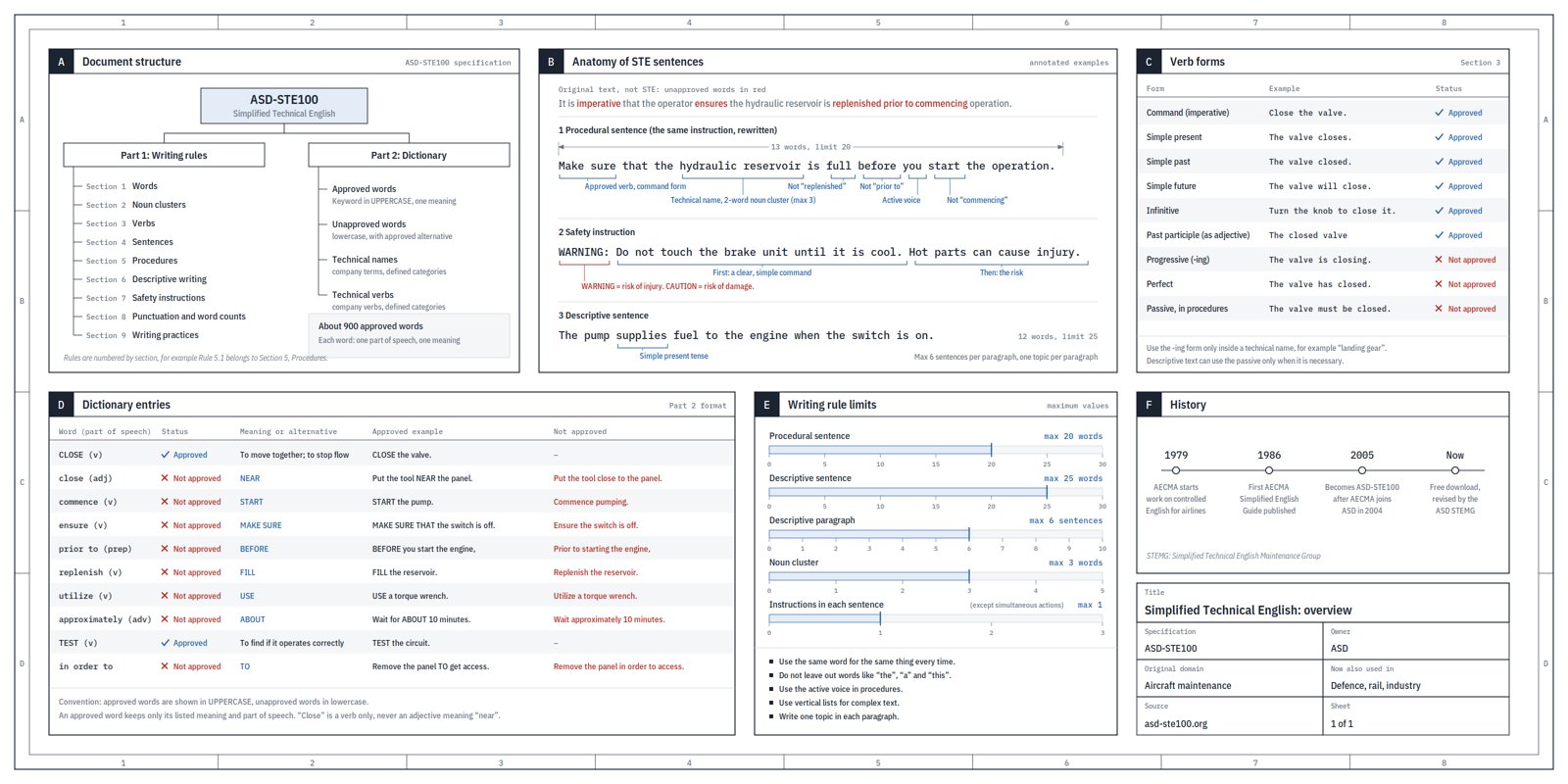
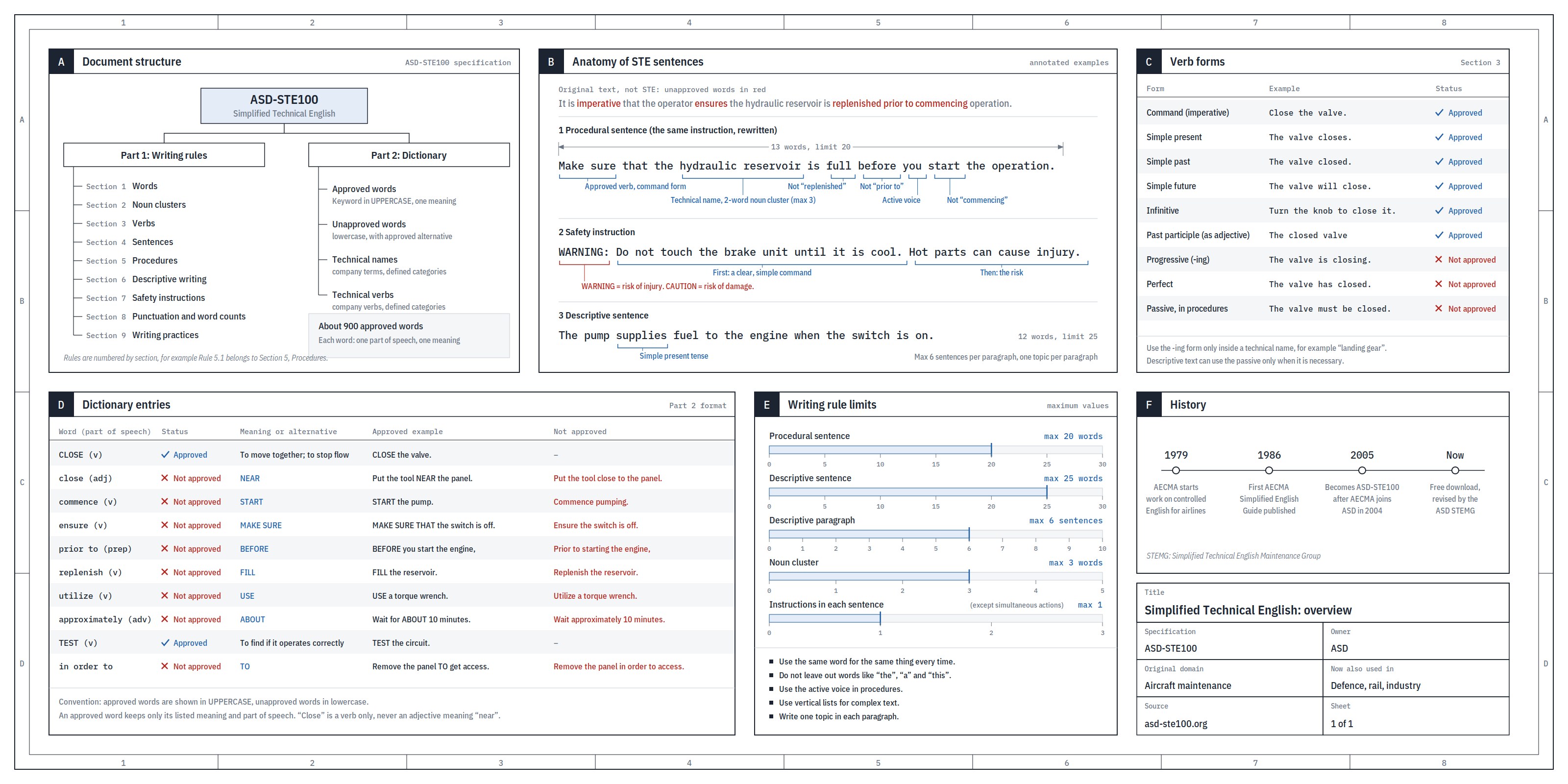
He ends: "you can ask for large, custom, discardable software artifacts (e.g. web apps, video explainers) that would have never made sense to create before." Below are the first three formats as techniques you can use tonight, each with one real example. A disclosure: Karpathy now works at Anthropic, and we ran every example in Claude (Opus 5.5). His tips are not tied to one AI, but Claude is the only one we tested.
Explain it like an aircraft manual
The technique. Name a strict writing standard in your prompt, and the AI writes to its rules. ASD-STE100 is a controlled form of English that Europe's aerospace industry built in the late 1970s, at the airlines' request, so that mechanics whose first language is not English would not misread an instruction (ASD-STE100). Its rules: one word for one meaning ("start", never "begin", "commence" or "initiate"), short sentences, and at most 20 words for an instruction (ASD, about STE). You do not need to know the rules. Karpathy's point is that the AI already does, so naming the standard is enough. A non-native reader with a document that must not be misunderstood is exactly an expat holding a German letter.
How to do it.
- Copy the text of the letter. Delete your name, address and tax number first; the AI does not need them to explain it.
- Write the prompt below and paste the letter under it.
- Keep the last sentence of the prompt. "Tell me what I must do, and by what date" is what turns an explanation into a to-do list.
- Too stiff? Karpathy's own fix: ask for "80% of the way to ASD-STE100".
- Read the answer against the letter once. Anything that is not in the letter is the AI's opinion, not the office's.
Explain this letter in ASD-STE100 Simplified Technical English. Short sentences. Tell me what I must do, and by what date.
What it looks like. We wrote a made-up reminder from "Finanzamt Musterstadt"; the rules it quotes are real (§ 152 of the German tax code). One paragraph of it, and the matching part of Claude's answer:
Ich bitte Sie, die Erklärung einschließlich der erforderlichen Anlagen bis spätestens 20.10.2026 nach amtlich vorgeschriebenem Datensatz durch Datenfernübertragung (ELSTER) zu übermitteln.
Wird die Erklärung nicht fristgerecht abgegeben, kann gemäß § 152 AO ein Verspätungszuschlag festgesetzt werden. Dieser beträgt für jeden angefangenen Monat der eingetretenen Verspätung 0,25 Prozent der um die festgesetzten Vorauszahlungen und die anzurechnenden Steuerabzugsbeträge verminderten festgesetzten Steuer, mindestens jedoch 25 Euro.
- Fill in your income tax return for 2025.
- Attach all the necessary forms (Anlagen).
- Send the return electronically through ELSTER. Do not send it on paper.
- Send it not later than 20 October 2026.
Deadline: 20 October 2026. Today is 6 October 2026, so you have 14 days.
Late fee (Verspätungszuschlag). For each month or part of a month that you are late, the fee is 0.25% of your tax. […] The minimum fee is 25 euros.
Claude kept the German words in brackets, so you can say them on the phone to the office. It also added one sentence that is not in the letter, "The estimate is usually not in your favor", which is why step 5 is there.
Don't write it, draw it
The technique. Ask for "a diagram" instead of an answer, and say what must be on it. Anything with branches, such as school types, a visa process or a tax year, is easier to see than to read.
How to do it.
- Put "as a simple diagram" in the prompt.
- Name what you need marked: the steps, the decision points, the ages or the dates. Without that you get a tidy picture that leaves out the part you care about.
- In Claude, the diagram opens in its own window beside the chat, called an artifact. This needs "Code execution and file creation" switched on in Settings › Capabilities, on the free plan too (Claude help).
- Then ask about the picture: "What changes if my child's first language is not German?" or "Show the same for Hesse." Each German state runs its own school system.
Show me the school system in Bavaria, Germany, as a simple diagram. Mark the decision points and the age at each step.
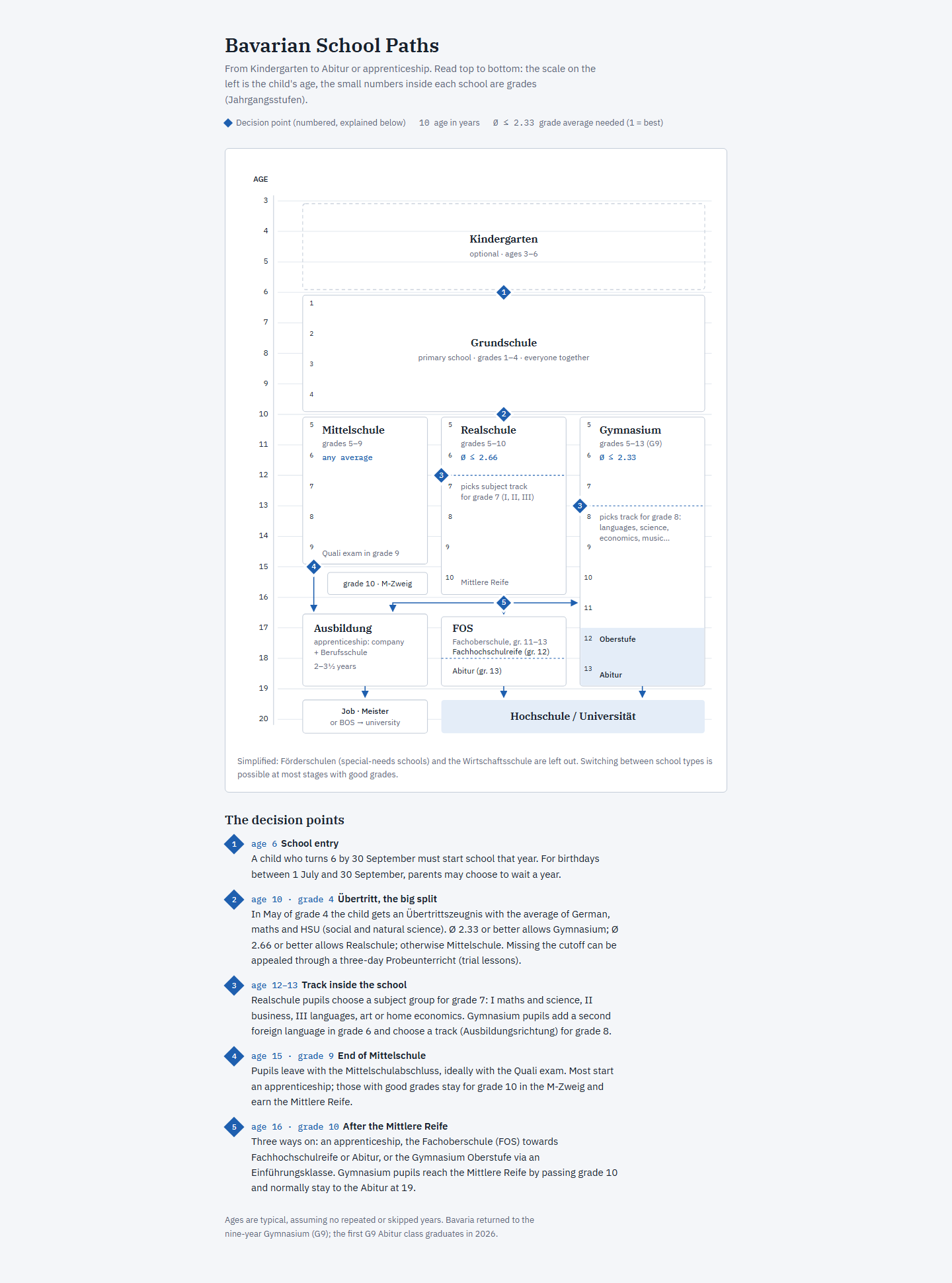
The main facts match the Bavarian rules: the transfer certificate in May of grade 4 (km.bayern.de), an average of 2.33 for Gymnasium and 2.66 for Realschule (§ 6 GrSO). What it left out is the rule that matters most to expats: a child whose first language is not German, and who did not attend a German Grundschule from grade 1, can qualify with an average up to 3.33 (§ 6 (6) GrSO). That is why step 4 is there.
Build me a page
The technique. Ask for "an interactive HTML page" and the AI builds a small working web page instead of writing an answer. HTML is the language web pages are written in; you never have to read it. The page can explain, quiz or calculate, and it can be made for one child and one evening.
How to do it.
- Start with "Create an interactive HTML page that…" and the goal.
- Say who uses it ("my 9-year-old") and how it should react ("instant feedback"). Those two details shape most of the result.
- In Claude, the page opens and runs beside the chat, and you can publish it and share the link (Claude help). If you get a block of code instead, save it as a file ending in
.htmland open it in your browser. - Play it yourself first, then ask for changes in plain words: "Fix the grammar", "Make the buttons bigger on a phone", "Add a harder level".
Create an interactive HTML page that helps my 9-year-old practice fractions. Make it colorful, with instant feedback.
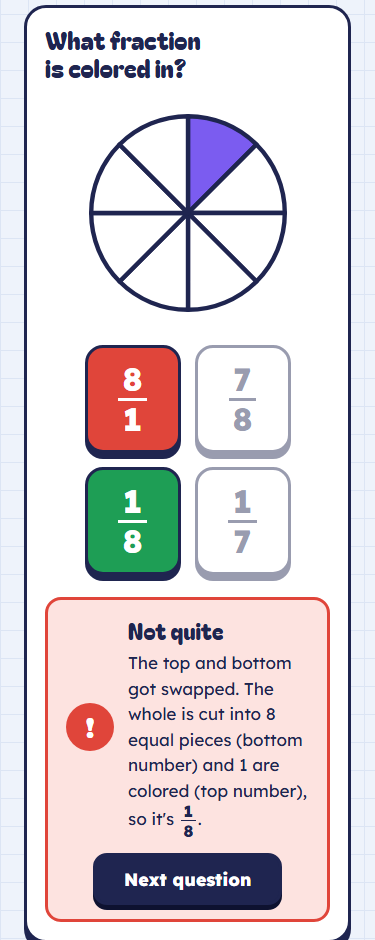
Where this is going: explainer videos
Karpathy's favourite format is the one most of us cannot use yet: a video made for one question, in the style of 3Blue1Brown, the YouTube channel known for animated maths explanations. His example prompt: "Create a 3b1b style video explainer on X. Use my ElevenLabs API key for audio narration." ElevenLabs is a service that turns text into a spoken voice; an API key is a password that lets software use a paid service for you. His verdict: "This is actually starting to work!"
Today this needs a coding tool on your computer and that key. It is not a tip for tonight, and if you try it from a chat window you will most likely be disappointed. To see how far it already goes, our guide Edit a video by talking to Claude shows the same idea with every prompt tested. And if enough of you want it, we will make an explainer video together at an After Hours session.
One rule to keep
If the answer is too long, don't ask again. Ask for it in another format: short sentences, a table, a drawing, a page you can click.
Karpathy's own summary is the bigger version of the same idea: as AI does more of the work, more of ours "will rise up the abstractions into oversight and understanding". The format you ask for is how you keep up. Credit, and his full list of tips: Andrej Karpathy on X, 2 October 2026.
Sources
- x.comAndrej Karpathy: tips & tricks for understanding AI output, 2 October 2026
- wikipedia.orgAndrej Karpathy
- cnbc.comAnthropic hires OpenAI co-founder Andrej Karpathy, 19 May 2026
- asd-ste100.orgASD-STE100 Simplified Technical English
- gesetze-im-internet.de§ 152 AO, late-filing fee
- km.bayern.deBavaria: transfer after Grundschule
- gesetze-bayern.de§ 6 GrSO, transfer to Gymnasium or Realschule
- support.claude.comClaude help: what are artifacts and how do I use them